Changelog

Follow new updates and improvements to Scenario.

Scenario v4.5

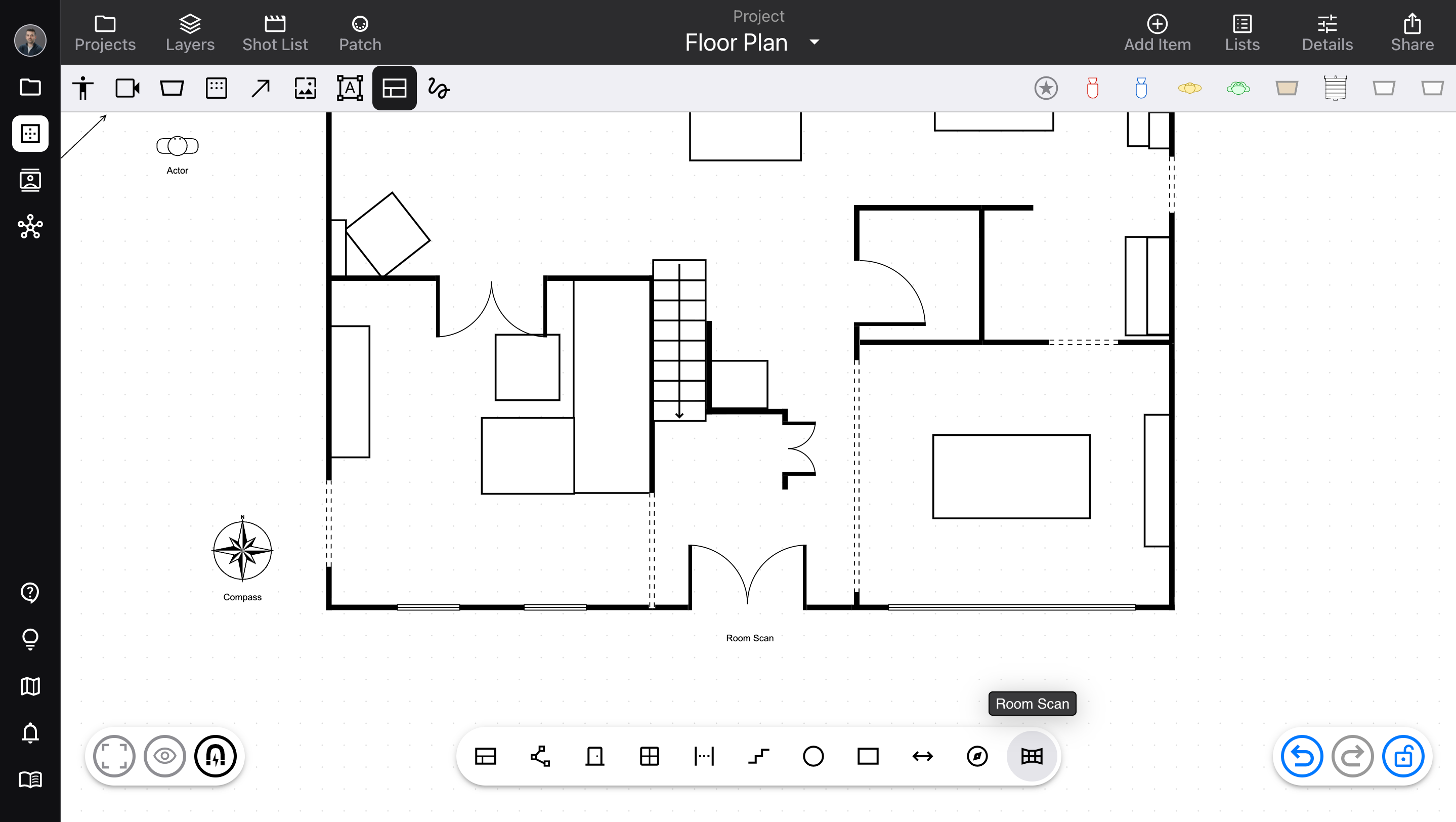
Revamped the diagram editor’s floor plan tools.

  • Released October 10, 2026

  • Availability: all devices, all accounts

Floor plan upgrades

Previously, floor plan items (Wall, Door, Window, and others) were included in the Add Item sidebar. However, this made them harder to access, and didn’t really fit with the other equipment.

  • Floor plan items now have their own toolbar. Open it using the Floor Plan button, next to Markup in “quick items”. From the toolbar, drag items onto the diagram.

  • We’ve added a new Room Scan tool! This works on any LiDAR-equipped device (iPhone and iPad, depending on the exact model), and allows you to make a 3D scan of any space. We save this data as a Room Scan item, which you can export as 3D data, or duplicate as an editable group of floor plan items (to make your own adjustments).

  • The Distance item can now position each endpoint independently – and you can connect one or both endpoints to other items, so you have a permanent, visible measurement.

  • The Rectangle item now has adjustable rounded corners.

  • Other usability fixes to floor plans; for example, automatically adding Door, Window, and Gap items to existing groups, when they’re connected to a Wall in a group.

For more info, check out Floor plan in the Help Center!
ImprovedDiagrams

Scenario v4.4

A collection of small usability updates from your requests!

  • Released September 28, 2026

  • Availability: all devices, all accounts

Updates

  • Selected items display a status message when locked by the Visibility settings, so it’s easy to recognize and deactivate

  • Separate options for DMX Channel and Address in Visibility

  • Allows typing leading zeros for DMX values

  • When Arrows are connected to items that are hidden, also hide the Arrows

  • For Lists usage, only count identical items once if they’re connected by Arrows

  • Updated Projects button style

  • Brightened the blue color to stand out better against dark backgrounds

Improved

Scenario v3.6

Massive improvements to List-building functionality, plus other usability improvements.

  • Released May 27, 2026

  • Availability: all devices, all accounts

Lists updates

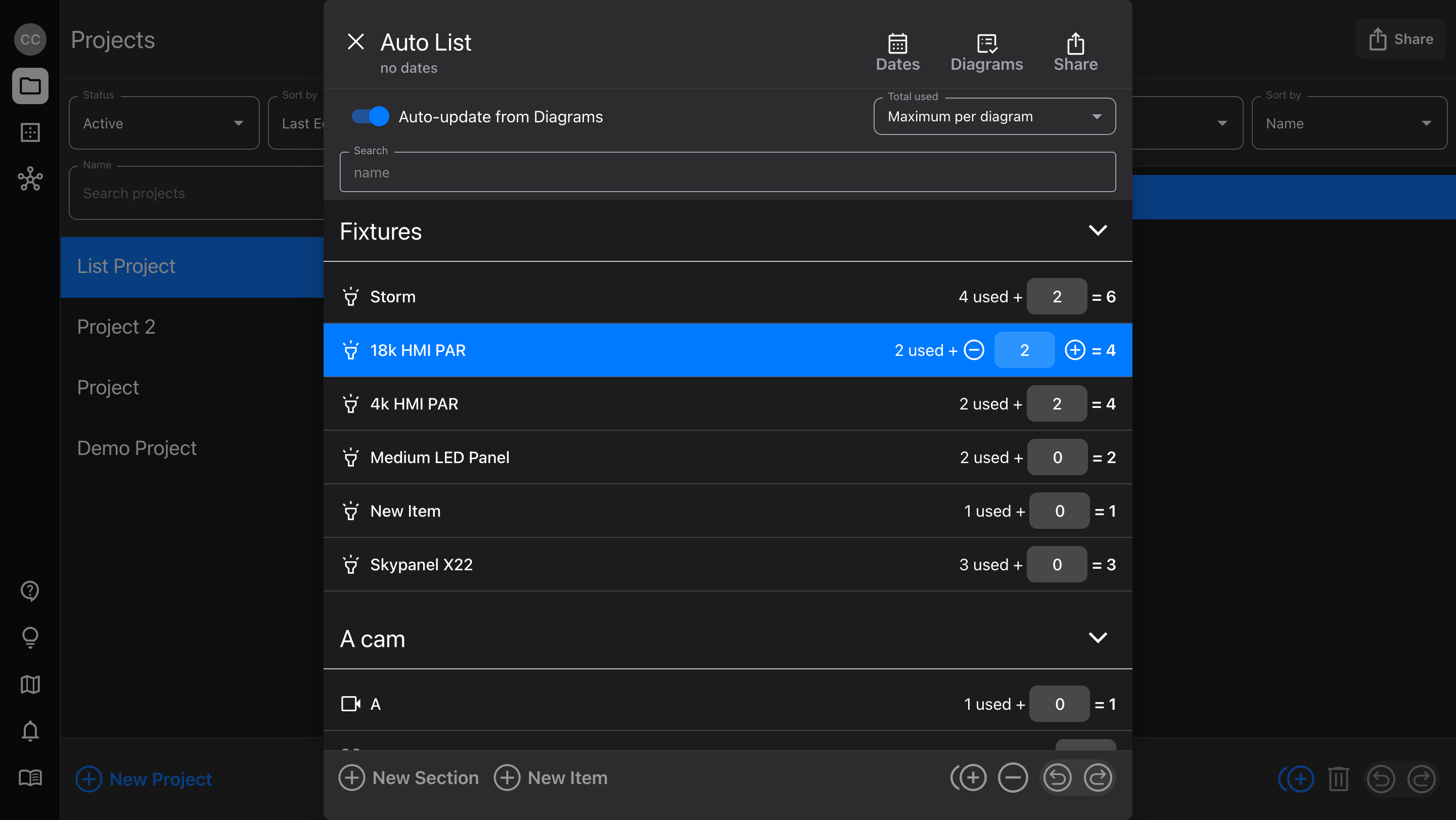
Lists have gotten a whole lot smarter! Now, they connect with your Diagrams and automatically update your equipment as you make changes.

  • Use the auto-sync function to count all uses of your equipment

  • Or, switch to manual mode and build Diagrams with the gear you have available

  • Add List items directly from the equipment library (with Cloud Library access for Pro users)

  • Make bulk changes to Diagram items by updating a manual List

  • Export Lists as PDF

Check out Lists for more details!

Diagram usability

  • When adding multi-page PDFs, select individual pages you’d like to add (for Image items, or Camera frame images)

  • Duplicate Markup items using ⌘ D, Option - drag, or the new bottom actions button

  • Combined some common actions in the pop-up menus to nested menus, to keep the list smaller and easier to use

    • Hide / Lock / Opacity

    • Bring to front / Send to back

    • Cut/Copy/Duplicate/Delete

  • For easier access to locked items on a Diagram, right-click over them and select Unlock item from the pop-up menu

  • Visible action names for Targeting, Adding, Swapping, and more

  • Added a Refresh Symbol button for Cloud Library Fixtures, to fetch the latest version of the Diagram symbol

    • Note: this does not reflect whether or not there is a newer version; that will come in the future

Bug fixes

  • When swiping up to send the app to the background on a mobile device, returning could show a small selection marquee at the bottom of the Diagram editor

v3.6.1

Small bug fixes and improvements:

  • When a new Project was created, its first List couldn't be deleted

  • File size limit not applied to multi-page PDFs

  • Activity spinner when updating List view

  • Fully updates List when Auto-update is toggled on, without re-opening the List editor

  • List PDF generator layout for portrait orientation

ImprovedLists

Earlier updates